Logitech Workplace Solutions for Australian businesses
Smarter spaces. Sharper meetings. Stronger teams.
Pro AV Solutions and Logitech help Australian organisations create better collaboration experiences, from individual workspaces to enterprise meeting rooms. We bring together intelligent workplace technology, expert integration, national delivery and ongoing support.

Logitech technology, designed and delivered by Pro AV Solutions
Logitech designs its meeting room devices and Logitech Sync management software to be simple to use and simple to manage. Pro AV Solutions turns that technology into rooms and workspaces that work the same way at every site, with one team responsible from design through to ongoing support.

Better experiences across every workspace
We match devices to each room layout, workstyle, collaboration platform and operational requirement, so meetings feel consistent from a huddle space to a boardroom or home office.

Simpler deployment at enterprise scale
Our project team plans and delivers the rollout site by site, from one office to a national program. Supported devices can then be monitored and updated through Logitech Sync, Logitech's device management platform.

Expertise beyond installation
We design around your IT, network and security requirements, document each standard, and support every space after handover through AVCare™ managed services, so your team has fewer suppliers and fewer moving parts to manage.
What workplace technology does Logitech offer businesses?
Logitech for Business covers two areas: Team Workspaces for the rooms where people meet, and Personal Workspaces for the desks where they work. Pro AV Solutions helps you choose, standardise and support the right mix across every location.

Team Workspaces

Personal Workspaces
Logitech solutions for every room type.
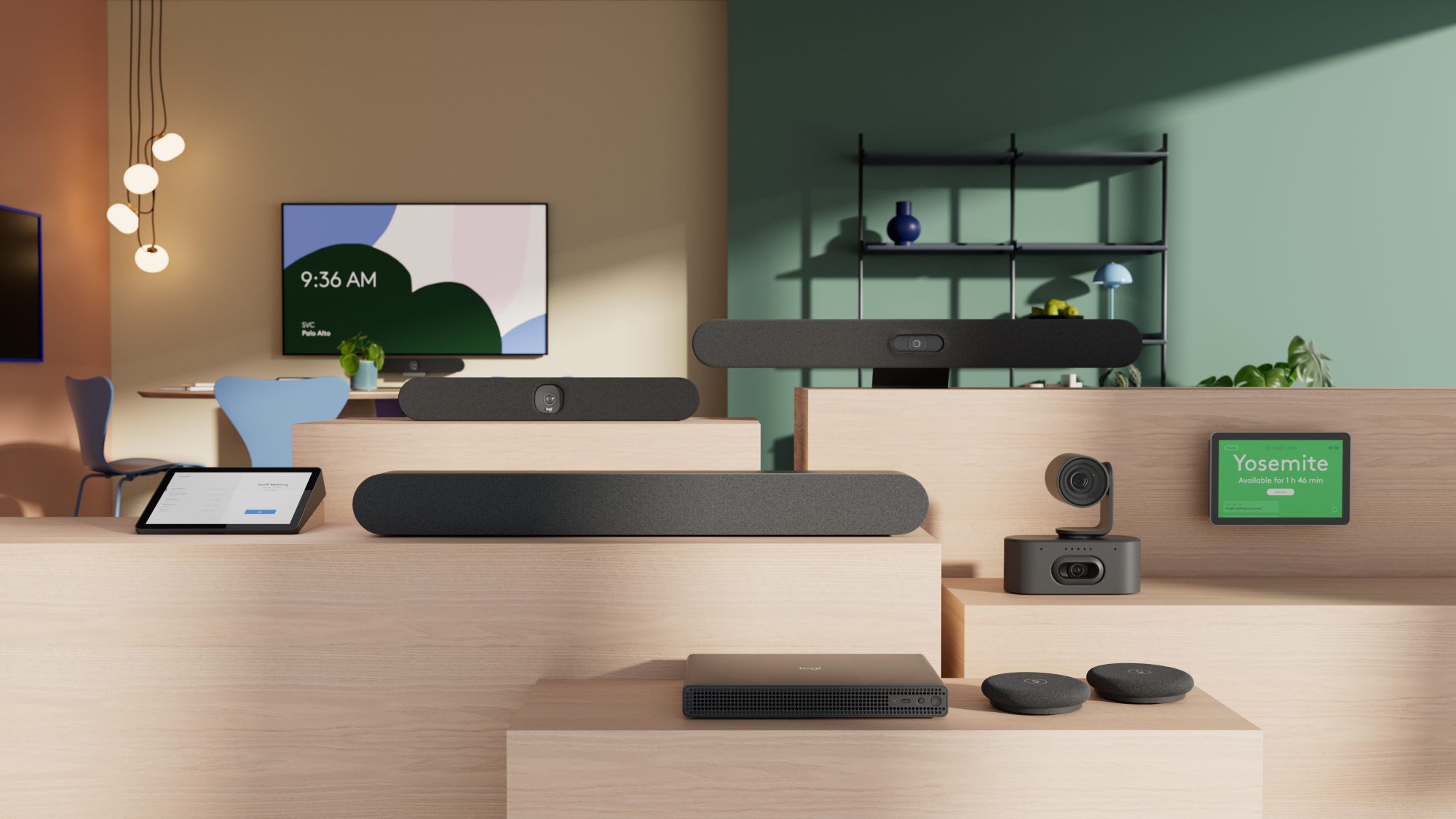
Logitech's Team Workspace portfolio covers four room types. We design each one around how people meet, then select and integrate the devices that make it easy to join, see and hear, consistently across your sites.
Phone booths and huddle rooms.
Compact rooms for quick, focused conversations, which Logitech sizes for up to six people. We set them up for fast, one-touch starts with integrated video and audio, plus simple bring-your-own-device connection, typically using Logitech Rally Bar Huddle.

Medium rooms.
The sweet spot for hybrid collaboration, which Logitech sizes for up to 14 people. We design these rooms with certified support for the major meeting platforms, the right compute option (appliance or PC-based) and clean cable management, typically using Logitech Rally Bar 2 with Rally Mic Pod 2 for wider tables.
Large meeting rooms and multipurpose spaces.
Larger rooms, which Logitech sizes for up to 20 people, need modular systems that scale. We combine multiple camera angles, extended microphone coverage and full-room visibility so everyone has an equal seat at the table, in the room or remote, using Logitech Rally AI Camera or Rally AI Camera Pro.
Portable solutions.
Training rooms, event spaces and unusual layouts change as your needs do. We build flexible setups from Logitech's portfolio and accessories, such as Rally Board 65 on a mobile stand, so the technology can move and adapt with the space.
One partner from design to deployment and support

Discover and design
We review your rooms, desks, collaboration platform and IT requirements, then recommend a Logitech standard for each type of space.

Integrate and deploy
We integrate Logitech devices with your displays, audio, network and collaboration platform, then install, configure and commission each space before handover.

Support and evolve
AVCare™ managed services provide ongoing maintenance and technical support, with upgrade paths and end-of-life planning as your workplace changes.
Not sure which devices suit your rooms?
Tell us about your room types, platforms and locations. A Pro AV Solutions specialist will recommend a Logitech standard that fits, from huddle rooms to boardrooms and personal workspaces.
Which Logitech video conferencing solution suits my room size?

Logitech Rally Board 65
An all-in-one 65-inch touchscreen with built-in camera, microphones and speakers. Suits small to medium rooms and open collaboration areas where teams meet, share and work on content together.
An all-in-one 65-inch touchscreen with built-in camera, microphones and speakers. Suits small to medium rooms and open collaboration areas where teams meet, share and work on content together.
General Specifications
Recommended for: Small to medium rooms and open collaboration areas
Built-in components: Microphone array, digital PTZ camera, depth-mapping camera, dual speakers and tweeters, motorised privacy shutter, radar motion sensing and environmental sensors
Second display and HDMI ingest: Up to 4K60
Requirements: 100–240 V power; wired or wireless internet; room solution software licence (not included)
Display
Screen: 65-inch UHD 4K LCD (3840 x 2160), 16:9
Touch: IR-based, 20 touch points
Finish: Anti-glare and anti-fingerprint coating
Brightness and contrast: 400 nits, 5000:1 (typical)
Camera
Main camera: 1-inch 20.3 MP sensor, up to 4K at 30 fps, 4x HD digital zoom
Field of view: 115.7° diagonal, 103.3° horizontal, 60.7° vertical
Depth-mapping camera: 145° diagonal, 121° horizontal field of view
Audio
Speakers: Dual 70 mm full-range ported speakers and dual 31 mm tweeters
Microphones: Front array, 90 Hz – 16 kHz, pickup range up to 7 m
Audio processing: RightSound 2 AI speech enhancement, AI beam selection and acoustic echo cancellation
Sensors
Temperature, humidity, tVOC, carbon dioxide, PM2.5, PM10, radar and ambient light
For current platform certification and compatibility, see logitech.com/support/vc-certifications

Logitech Rally AI Camera Pro
A dual-camera system for large rooms, boardrooms, training rooms and town halls. It adds reach and presenter framing where a single video bar would not cover the space.
A dual-camera system for large rooms, boardrooms, training rooms and town halls. It adds reach and presenter framing where a single video bar would not cover the space.
General Specifications
Recommended for: Large rooms, boardrooms, training rooms and town halls
Platform certifications: See Logitech's current video conferencing certification and compatibility list
Resolutions above 1080p: 4K at 30 fps
Video
Resolution: 4K, 1440p, 1080p, 900p, 720p and SD at 30 fps
Zoom: 15x (5x optical, 3x digital)
Pan and tilt: ±90° pan; +50° / –90° tilt
Field of view: 90° diagonal, 82° horizontal, 52° vertical
Audio
Microphones: 8 omnidirectional digital MEMS beamforming elements
Frequency response: 90 Hz – 16 kHz; 48 kHz sampling rate
Audio processing: Beamforming and direction of arrival, used for camera framing
Connectivity
USB 3.2 Gen 1; Wi-Fi 802.11 a/b/g/n/ac/ax; Bluetooth Low Energy 5.3

Logitech Rally AI Camera
A discreet, low-profile camera for medium to large rooms. AI framing keeps participants in view, and it can be combined with other Rally cameras in compatible multi-camera rooms.
A discreet, low-profile camera for medium to large rooms. AI framing keeps participants in view, and it can be combined with other Rally cameras in compatible multi-camera rooms.
General Specifications
Recommended for: Medium to large rooms, in single-camera or compatible multi-camera setups
Resolutions above 1080p: 4K at 30 fps
Video
Resolution: 4K, 1440p, 1080p, 900p, 720p and SD at 30 fps
Zoom: 4x HD digital zoom
Field of view: 115.7° diagonal, 103.3° horizontal, 60.7° vertical
Audio
Microphones: 8 omnidirectional digital MEMS beamforming elements
Frequency response: 90 Hz – 16 kHz; 48 kHz sampling rate
Sensitivity: –36 dBFS ±1 dB @ 1 Pa
Audio processing: Beamforming and direction of arrival, used for camera framing

Logitech Rally Bar Huddle
A compact all-in-one video bar for huddle rooms and small collaboration spaces. It can run as a room appliance, connect to a meeting room PC, or work with a laptop for BYOD meetings.
A compact all-in-one video bar for huddle rooms and small collaboration spaces. It can run as a room appliance, connect to a meeting room PC, or work with a laptop for BYOD meetings.
General Specifications
Recommended for: Huddle rooms and small collaboration spaces
Built-in components: Six-microphone array, digital PTZ camera, full-range speaker, motorised privacy shutter, Multi Mount and cable retention
Platform: Logitech CollabOS, managed through Logitech Sync
Displays supported: 1 (1080p)
Network: IPv4 and IPv6; IP, FQDN and PAC file proxy support
Camera
Resolution: 4K; 4x HD digital zoom
Digital pan and tilt: ±48° pan, ±32° tilt at 4x zoom
Field of view: 120° diagonal, 113° horizontal, 80° vertical
Audio
Speaker: 55 mm full-range driver, 8 W rated power
Microphones: Six omnidirectional digital MEMS microphones forming five adaptive beams
Pickup range: Up to 7 m; frequency response 90 Hz – 16 kHz
Audio processing: Acoustic echo cancellation, voice activity detection and AI-based noise suppression

Logitech Rally Bar 2
Logitech's next-generation all-in-one video bar for medium to large meeting rooms, including deep and wide layouts. Certified for Microsoft Teams Rooms, Zoom Rooms and Google Meet, and managed through Logitech Sync.
Logitech's next-generation all-in-one video bar for medium to large meeting rooms, including deep and wide layouts. Certified for Microsoft Teams Rooms, Zoom Rooms and Google Meet, and managed through Logitech Sync.


General Specifications
Room size: Medium to large meeting rooms, including deep and wide layouts
Platforms: Certified for Microsoft Teams Rooms, Zoom Rooms and Google Meet
Deployment: Android-based or PC-based room system, or BYOD mode
Camera: Custom camera with a 1-inch sensor and redesigned lens
Audio: RightSound 3 on-device AI audio; four speakers including two tweeters
Expansion: Add Rally Mic Pod 2 for wider microphone coverage
Room sensors: Temperature, humidity, tVOC, carbon dioxide, PM2.5, PM10, radar and ambient light (environmental and occupancy insights require additional Logitech services)
Device management: Logitech Sync, with auto-provisioning for large rollouts
Security: Built on Microsoft Device Ecosystem Platform (MDEP)
Design: Aluminium unibody designed for easier recycling
Dimensions: 97 x 860 x 93 mm; 4.8 kg

Personal Workspaces
What are Logitech Personal Workspace solutions?
Business webcams, headsets, keyboards, mice and docking stations that improve productivity, communication and collaboration across office, hybrid and remote work. They suit individuals, remote workers and enterprise teams, and Logitech groups them by workstyle:
Core: high-quality, dependable tools that help everyday professionals work efficiently and collaborate.
Advanced: precision devices for power users such as developers, creatives and analysts.
Ergonomic: comfortable, easy-to-use products that support employee choice and wellbeing at the desk.
We help you choose a standard kit for each workstyle, roll it out across your sites and keep it managed through Logitech Sync.
Logitech personal workspace devices

MX Master 4 for Business
For power users in design, finance, engineering and analysis. High-precision tracking, MagSpeed scrolling, haptic feedback and customisable controls, with Logi Bolt connectivity and Logitech Sync visibility for IT.
For power users in design, finance, engineering and analysis. High-precision tracking, MagSpeed scrolling, haptic feedback and customisable controls, with Logi Bolt connectivity and Logitech Sync visibility for IT.
Key Features
Tracking: 8K DPI sensor that works on almost any surface, including glass
Scrolling: MagSpeed electromagnetic scroll wheel
Controls: Customisable haptic feedback and Actions Ring shortcuts through Logi Options+
Connectivity: Logi Bolt USB receiver or Bluetooth

MX Brio 705 for Business
For leaders, presenters and hybrid workers who spend much of the day on camera. A 4K webcam with automatic light correction, autofocus and auto-framing, plus dual beamforming microphones.
For leaders, presenters and hybrid workers who spend much of the day on camera. A 4K webcam with automatic light correction, autofocus and auto-framing, plus dual beamforming microphones.
Video
Resolution: 4K at 30 fps; 1080p and 720p at 30 or 60 fps
Image sensor: 8.5 MP Sony STARVIS
Field of view: 90°, 78° or 65° diagonal; 4x digital zoom
Focus and lens: Autofocus with glass lens
Light correction: RightLight 5 with HDR and face-based image enhancement
Audio and Setup
Microphones: Dual beamforming, range up to 1.2 m
Connectivity: USB-C plug-and-play; integrated privacy shutter
Mounting: Detachable universal clip for laptops, displays and monitors
Management: Logitech Sync for deployment at scale; image adjustments through Logi Tune (Windows and macOS)

Signature Slim Solar+ K980 for Business
For assigned desks. A full-size wireless keyboard powered by natural or artificial light, so there are no regular battery changes or charging cables for IT to manage.
For assigned desks. A full-size wireless keyboard powered by natural or artificial light, so there are no regular battery changes or charging cables for IT to manage.
Overview
A full-size wireless keyboard powered by natural and artificial light. Logi LightCharge energy management keeps it charged without regular battery changes or charging cables.

Zone Wireless 2 ES
For hybrid workers and open-plan offices. A wireless headset with adaptive hybrid active noise cancellation and noise-cancelling microphones for clearer calls and focused work.
For hybrid workers and open-plan offices. A wireless headset with adaptive hybrid active noise cancellation and noise-cancelling microphones for clearer calls and focused work.
Overview
Adaptive hybrid active noise cancellation (ANC) reduces distractions in busy environments. 40 mm speakers are tuned for calls, music and ANC, and noise-cancelling microphones help the wearer be heard clearly.

Logi Dock Flex
For shared desks and hot-desking floors. Employees plug in their laptop to claim a desk booking, and integration with Logitech Desk Booking and Sync gives IT visibility of desks and devices.
For shared desks and hot-desking floors. Employees plug in their laptop to claim a desk booking, and integration with Logitech Desk Booking and Sync gives IT visibility of desks and devices.
Overview
Employees claim a booked desk by plugging in their laptop. The dock connects desk peripherals for a consistent setup at any desk, gives IT a simple way to manage devices, and provides desk-usage data for workplace teams.
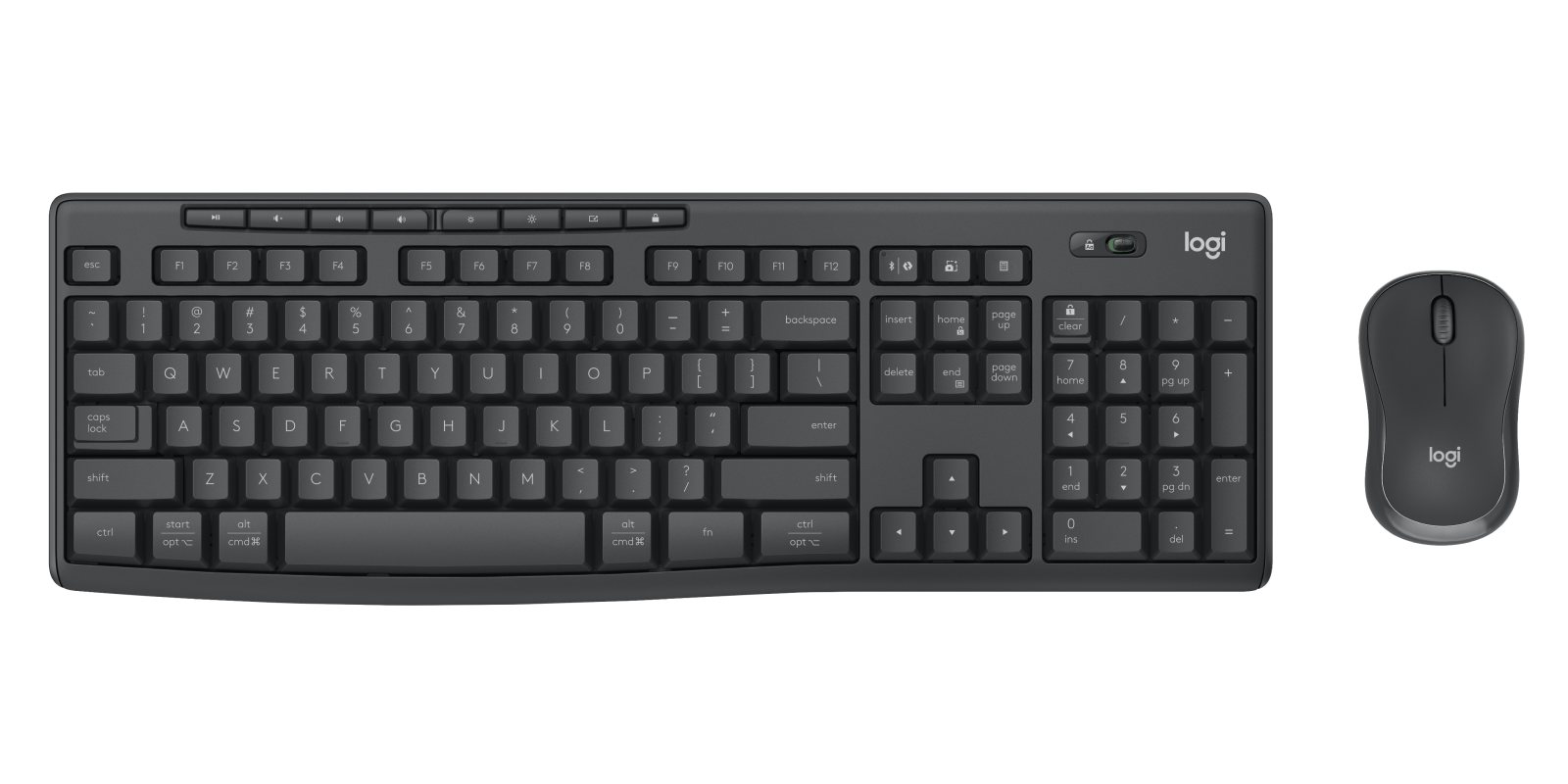
MK370 Combo for Business
For large rollouts and standard desk setups. A spill-resistant keyboard and Silent Touch mouse come pre-paired over Logi Bolt, reducing setup work for IT teams.
For large rollouts and standard desk setups. A spill-resistant keyboard and Silent Touch mouse come pre-paired over Logi Bolt, reducing setup work for IT teams.
Overview
Spill-resistant full-size keyboard with eight shortcut keys and a Silent Touch mouse. Pre-paired to a Logi Bolt USB receiver, with Bluetooth Low Energy as an alternative. Works with all major operating systems. 2-year limited hardware warranty.

Lift for Business
For people who spend long hours at a desk. A vertical mouse that places the hand at a 57° angle for a more natural posture, in right- and left-handed models.
For people who spend long hours at a desk. A vertical mouse that places the hand at a 57° angle for a more natural posture, in right- and left-handed models.
Overview
Vertical design at a 57° angle. Right- and left-handed models. Up to 24 months battery life with the included AA battery. Logi Bolt USB receiver or Bluetooth Low Energy. Graphite model made with 70% certified post-consumer recycled plastic.
Trusted by organisations across Australia to deliver and support their workplace technology.



Experience the future of workplace technology for yourself.
Schedule a visit to one of our Experience Showrooms located around Australia to try the latest in workplace and AV technology for yourself. From simple demonstrations to in-depth discovery workshops, we provide expert, no-obligation guidance and advice. By appointment only.


Frequently Asked Questions
What Logitech workplace solutions are available for Australian organisations?
Logitech for Business covers two areas. Team Workspaces include Rally video bars, the Rally Board 65 all-in-one touchscreen and Rally AI cameras for meeting rooms of every size. Personal Workspaces include business webcams, headsets, keyboards, mice and docks for assigned desks, shared desks and hybrid workers. Pro AV Solutions designs, deploys and supports both for organisations across Australia.
Which Logitech video conferencing solution suits my meeting room?
It depends on room size, layout and how the room is used. As a guide, Rally Bar Huddle suits huddle and small rooms. Rally Bar 2, the successor to Rally Bar, suits medium to large rooms and can be extended with Rally Mic Pod 2 for wider tables. Rally Board 65 suits small to medium rooms and open collaboration areas. Rally AI Camera and Rally AI Camera Pro support larger and more complex rooms, including boardrooms and training spaces. We confirm the right setup after reviewing your spaces.
Are Logitech devices compatible with Microsoft Teams, Zoom and Google Meet?
Logitech Rally video bars and cameras are certified for leading platforms including Microsoft Teams, Zoom and Google Meet, but certification varies by model, platform and deployment mode (appliance, PC-based or bring your own device). Rally Bar 2, for example, is certified for Microsoft Teams Rooms, Zoom Rooms and Google Meet. We check current certification for each device and platform before recommending a solution.
Can Logitech technology be standardised across multiple offices?
Yes. A common approach is to define a standard Logitech setup for each room type, and an approved kit for each workstyle, then roll them out site by site. Logitech Sync lets IT teams monitor and update supported devices centrally. Pro AV Solutions plans and delivers multi-site rollouts and supports the technology after handover through AVCare™ managed services.
Can Pro AV Solutions design, integrate and support Logitech workplace solutions?
Yes. We assess your rooms and workspaces, design the right Logitech solution, integrate it with your displays, audio, network and collaboration platform, and commission each space before handover. After installation, AVCare™ managed services provide ongoing maintenance and technical support.
Where can I experience Logitech technology or discuss a deployment?
Pro AV Solutions has Experience Showrooms in Canberra, Sydney, Melbourne, Brisbane, Adelaide and Perth, open by appointment. Contact us to check which Logitech solutions can be demonstrated at your nearest showroom, or call our sales team on 1300 287 253 to discuss your rooms, sites and platform.
Tell us about your meeting rooms, hybrid working needs, personal workspace technology, number of offices, preferred collaboration platform and how you would like the technology deployed and supported. Call our team on one of the numbers below, or send us a message and a specialist will be in touch.